Ragdoll Destruction Playground Map Reset and Session Flow
Why Harpax Dev tells you to reset when you are ready for more destruction �?and how to build that habit into every sandbox loop.
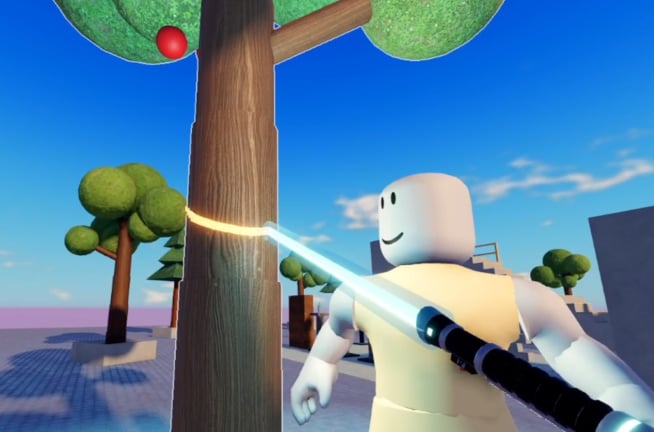
The official description for Ragdoll Destruction Playground puts map reset in the spotlight: have fun wrecking the world with intelligent ragdolls, then reset your map when you are ready to cause more destruction. That sentence is the design loop. This guide explains why reset matters, when to use it, how it interacts with props and fire, and how to structure a session so every wreck feels intentional.
Pair this page with Getting Started for onboarding and Controls to locate the reset control in your current build.
Why reset exists
Destruction sandboxes accumulate state. Explosives scatter debris. Fire continues to burn. Props settle in awkward piles. Ragdolls end up in corners where the next experiment is hard to stage. Without a reset:
- New blasts become unreadable because the floor is already chaos
- Performance can feel heavier as objects pile up
- Slow-motion clips show leftover mess instead of a clean subject
- Unlockable tests get contaminated by yesterday’s wreckage
Map reset restores a known baseline. It is not an undo for a mistake; it is the sandbox equivalent of a new take on a film set.
When to reset
Use reset when any of these are true:
- You finished a set piece �?the explosive landed, the chainsaw chase ended, you watched the reaction.
- Fire or debris blocks movement �?you cannot reach the next prop pile safely.
- You cannot tell what caused what �?too many tools stacked; start over with one variable.
- You are about to record �?clean floor, clear subject, then arm tools and slow motion.
- You feel done with this layout �?curiosity shifted to a different weapon or unlockable.
- FPS or input feels mushy �?large fire and fragment piles hurt weaker devices.
- You are comparing tools �?fair A/B tests need the same starting props after each take.
Do not wait until the map is unplayable. Early resets keep momentum high.
Props cleanup and what reset buys you
Props are mass and fuel for chain reactions. After a few blasts they stop being useful set dressing and start being noise. Resetting clears that noise so you can:
- Restack or reposition props for a planned collapse
- Open lanes for minigun tracking
- Place a single explosive with a known radius
- Re-engage NPCs from their default behaviours instead of odd post-blast poses
If the build offers partial cleanup tools later, great �?until then, full map reset is the reliable broom. Confirm the button or key after patches; UI moves are common in early access. Prefer the official reset over third-party cleanup helpers on Scripts so you learn the loop Harpax Dev is balancing.
Recommended session flow
A strong single-player session looks like a series of short experiments:
Block A �?Warmup (5 minutes)
Join, check controls, fire a short minigun burst, reset.
Block B �?Tool focus (10 minutes)
Pick one focus from Weapons and Explosives (minigun, chainsaw, or explosives). Run two or three takes. Reset between takes.
Block C �?Cinematic take (5�?0 minutes)
Stage props, enable slow motion for the climax, capture the moment, reset immediately after you are satisfied.
Block D �?Unlockable compare (optional)
Equip a new unlockable, repeat Block B’s combo, note differences, reset. Rank what you liked on the Weapons Tier List.
Block E �?Codes and wrap
If you have rewards waiting, redeem via the Codes Hub flow, then either start a new block or leave while the session still feels sharp.
This rhythm matches the official advice: wreck, then reset for more wrecking. It also prevents the fatigue of wandering a ruined map looking for a fresh angle that is no longer there.
Experiment log template
Keep a simple note (phone notepad is fine):
- Setup: props used
- Tool: minigun / chainsaw / explosive / fire
- Slow-mo: yes/no and when you toggled
- Result: one sentence
- Next change: one variable only
- Reset: done
After five loops you will outgrow random spraying and start building signature scenes. New toys from the Minigun + Chainsaw Update deserve fresh maps so you do not judge them on a cluttered floor.
Reset and multiplayer plans
Today the experience is single-player (max 1), so reset only affects your private sandbox. When multiplayer arrives as planned, reset etiquette may change �?shared worlds need agreement before wiping state. Until then, reset freely. Track server-size news on Updates and community chatter via Players.
Troubleshooting the habit
“I forget to reset.”
Treat reset as the last step of every combo checklist: select tool �?act �?watch �?reset.
“Reset feels like losing progress.”
Your progress is skill and unlocks, not debris. The map is meant to be disposable.
“I cannot find the control.”
Scan HUD buttons and menus for reset / clear / restart map. Re-check after updates; see Controls. Confirm you are on the real Harpax Dev place via Links.
“I reset too early.”
If you cut before fire finishes spreading, you miss half the show. Watch the beat under slow motion, then reset.
“I change three variables between resets.”
You learn nothing. Change one thing only, then reset again.
Tying reset to the rest of the wiki
- Learn the verbs on Controls
- Plan the wreck with Weapons and Explosives
- Film the climax with Slow Motion
- Browse all tutorials from the Guides Hub
- Keep official destinations handy on Links
Map reset is how Ragdoll Destruction Playground stays a playground. Use it early, use it often, and every new destruction idea gets the clean stage it deserves.
Frequently Asked Questions
Quick answers to the most common questions.
Does the game expect me to reset often?
Yes. The official description explicitly tells you to reset the map when you are ready to cause more destruction.
Will reset remove unlockables I earned?
Reset clears scene state (props, debris, fire, ragdoll positions). Persistent unlock progress should remain; if a patch behaves oddly, note it on the Updates Hub.
Should I reset before using slow motion?
Often yes. A clean map makes slowed climaxes readable. Stage the scene, then slow for the finale, then reset again.
Is there a partial cleanup instead of full reset?
Depends on the current build. When in doubt, full map reset is the reliable way to restore a baseline.
How does reset work if multiplayer ships later?
Today you play alone, so reset is personal. Shared servers may need new etiquette; watch patch notes when max players change.
Can scripts replace map reset?
Sometimes community menus try, but vanilla reset is the intended, reliable tool. Prefer it while learning the sandbox.