Getting Started in Ragdoll Destruction Playground
A first-session walkthrough for Harpax Dev's physics sandbox �?wreck the world, then reset and go again.
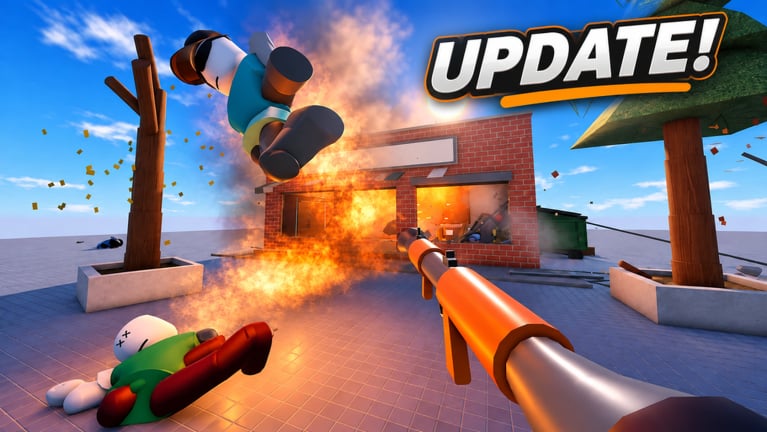
Ragdoll Destruction Playground is a single-player Roblox physics sandbox by Harpax Dev. You join alone, pick tools, and push intelligent ragdolls and destructible props until the map is a mess. There is no campaign to finish and no lobby to wait for. Your job in the first session is simple: learn the UI, try a few weapons, feel slow motion, reset the map when the scene is cluttered, and notice what unlockables and NPC behaviours look like so later visits feel intentional.
This page is for the correct experience �?the interactive destruction sandbox at place ID 135471930388646 �?not the separate 2D Ragdoll Playground titles. If a guide talks only about Granule-style side views or Speedwagon-style rooms, you are on the wrong wiki.
Join the experience and set expectations
Open the official game page, favorite it so updates are easier to track, then press Play. Servers are sized for one player (maxPlayers 1). Multiplayer is planned in the official description, but today you get a private sandbox. That means no shared chaos yet �?and also no competition for props or weapons. Take your time.
The game is early in development. Features such as slow motion, explosives, additional weapons, props, unlockable items, NPC behaviours, and fire arrived as a concentrated update wave. Treat anything you find as living content: tool lists, UI labels, and unlock paths can shift between patches. Cross-check the Updates Hub after major drops, and keep this Guides Hub bookmarked for mechanic deep dives.
First minutes: UI orientation
After load-in, pause before you empty a magazine into the nearest wall. Scan the HUD and any on-screen buttons for:
- Weapon or tool selection (minigun, chainsaw, explosives, and other props as they unlock)
- Slow-motion toggle or slider
- Map reset / clear scene control
- Any unlock, shop, or progress panel the build currently exposes
Roblox sandbox UIs change often in early access. If a label is unclear, open the in-game settings or keybind screen and note what is bound. Our Controls page explains typical sandbox patterns and when to trust the on-screen key list instead of a wiki table.
Spend two or three minutes just walking the map. Identify solid scenery versus breakable props, where ragdoll NPCs spawn or idle, and where fire or blast effects leave lasting mess. That mental map makes the rest of the session faster.
Try weapons without overcomplicating it
Pick one ranged option and one melee option before you invent elaborate setups. The minigun is the easy way to learn spray, recoil feel, and how ragdolls react to sustained hits. The chainsaw teaches close-range contact, follow-through, and how props behave when you stay in their faces. Explosives and fire are the third lesson: place or throw, step back, and watch secondary effects �?burning props, chain reactions, and NPCs reacting to heat or blast.
Do not chase every unlockable in minute one. Fire short bursts, watch limb motion, then try a single explosive so you can see radius and debris. When you want structured combo ideas, jump to Weapons and Explosives. For ranking-style opinions later, browse the Tier List Hub or the focused Weapons Tier List. Patch context for the new arsenal lives on the Minigun + Chainsaw Update page.
Use slow motion on purpose
Slow motion is not only a gimmick. Blasts, ragdoll collapses, and fire spread happen too fast at full speed to read. Toggle slow motion right before a big detonation or chainsaw rush, then watch how bodies and props separate. That habit turns random wreckage into readable physics �?and it is the same technique creators use for cinematic clips.
For a visual reference of slow motion, explosives, and fire together, see the dedicated Slow Motion guide (it embeds the verified showcase video). Practice the same sequence yourself: arm an explosive, enable slow motion, trigger the blast, then decide whether the scene needs a reset.
Reset the map as part of the loop
The official description is blunt: reset your map when you are ready to cause more destruction. Cluttered floors, stacked debris, and leftover fire make the next experiment harder to control. After a satisfying wreck �?or after the frame rate feels heavy �?hit map reset, confirm the scene is clean, and start a new idea.
A healthy first-session loop looks like this:
- Choose one tool focus (minigun spray, chainsaw chase, or explosive set piece).
- Optionally enable slow motion for the climax.
- Observe NPC and prop reactions.
- Reset the map.
- Repeat with a different tool or a simple combo.
Details and timing tips live on Map Reset. Resetting early is not failure; it is how the sandbox stays fun.
Unlockables and NPC behaviours mindset
Unlockable items and smarter NPC behaviours are part of the current feature set. Treat unlocks as a long-term checklist, not a speedrun. Try the default tools thoroughly so you recognize what a new unlock actually changes. Watch how NPCs flee, idle, or react to fire and blasts �?those behaviours are half the entertainment.
If the build exposes a codes, shop, or reward entry point, redeem anything listed on the Codes Hub before a long session so new toys show up while you are still exploring. Script menus and executor tools are a separate topic covered on Scripts; they are optional and unrelated to learning the intended sandbox loop.
First-session checklist
- Joined the correct Harpax Dev place (not a similarly named ragdoll game)
- Found tool selection, slow motion, and map reset on the HUD or in menus
- Completed one minigun test and one chainsaw or melee contact test
- Triggered one explosive and watched for fire
- Used slow motion on purpose during a climax
- Reset the map at least once
- Bookmarked the Guides Hub and Updates Hub
Link out and plan session two
By the end of session one you should know how to join, where the main UI toggles live, how minigun / chainsaw / explosives roughly feel, when slow motion helps, and why map reset exists. Session two can go deeper:
- Refine aim and movement habits on Controls
- Build intentional set pieces with Weapons and Explosives
- Capture cleaner clips via Slow Motion
- Keep scenes readable with Map Reset
- Skim Players for community context and Links for official destinations
Favorite the experience, leave feedback for Harpax Dev if something breaks, and return after patches. Early sandboxes reward players who reset often, watch the physics, and grow their unlock list without rushing.
Frequently Asked Questions
Quick answers to the most common questions.
Is Ragdoll Destruction Playground the same as Ragdoll Playground?
No. This wiki covers Ragdoll Destruction Playground by Harpax Dev (place 135471930388646), a single-player destruction sandbox with slow motion, minigun, chainsaw, explosives, and map reset. It is not the 2D Ragdoll Playground experiences.
Can I play with friends right now?
Servers are single-player (max 1). The official description says multiplayer is planned, so check the Updates Hub after patches for any change to server size.
What should I do in my first five minutes?
Orient on the UI, try one ranged and one melee tool, trigger slow motion during a blast, then reset the map and repeat with a cleaner scene.
Where do I redeem codes?
Use whatever codes or shop panel the current build exposes, and keep the Codes Hub list handy. Exact UI labels can change in early access.
Why does the game tell me to reset the map?
Debris, fire, and scattered props pile up quickly. Resetting clears the playground so you can run a fresh destruction idea without fighting leftover clutter.